

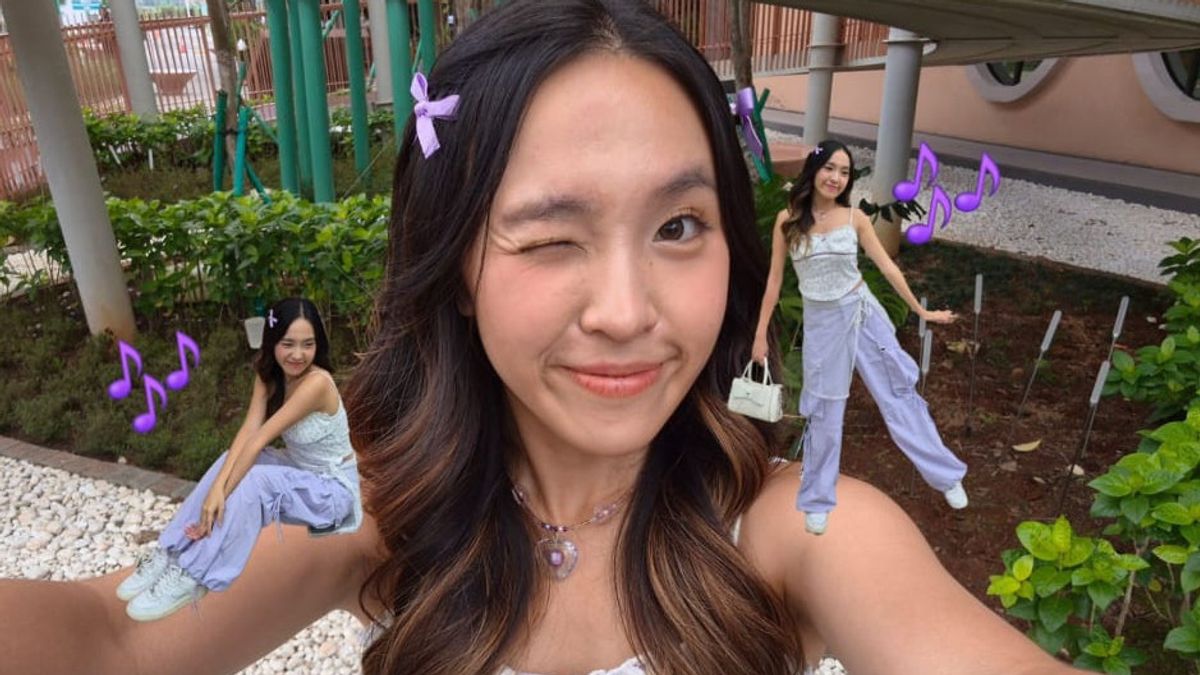


JAKARTA Samsung made a new breakthrough by launching the Galaxy S25 FE. This device comes with a variety of advanced photo editing capabilities, supported by the Generative Edit feature and the integration of Gemini Nano Banana.
These two features make editing experience much easier for anyone, both content creators and professional workers. Users can take advantage of Gemini AI and Generative Edit features from this affordable flagship phone to create as creative content as possible.
Editing Is Getting Easier Thanks To Gemini Nano Banana
The Galaxy S25 FE is one of Samsung phones equipped with Gemini AI, an advanced assistant to Google. This smart partner can help users develop their creativity through simple promotions.
Users can create polaroid photos with loved ones, their favorite game characters, Korean idols, or even family members who have died. Everything can be done just by uploading a few photos to Gemini Nano Banana, then including the following prompt.
"Create a photo taken with a Polaroid camera. Photos must look like ordinary photos without property covering up. Photos must have a slight effect of blur and a consistent source of light, such as lightning from a dark room scattered throughout the photo. Don't change your face. Make the man/woman in the photo touch my head. Change the background with a white curtain."
Interestingly, Gemini Nano Banana can process up to ten photos at once so that users can combine several separate people into one. Make sure the prompt entered is not wrong.
Users can also have a simple photo effect using Gemini Nano Banana, such as making photos clearer or creating photos of users such as being in professional photo studios. Editing like this can be done by entering the following prompt.
"Make this photo seem to be taken in a professional photo study. Change the background of the photo with a solid white color and include soft lighting."
Create Out Of Frame Photo Trends With Generative Edit
The Samsung Galaxy S25 FE also offers a Generative Edit, an image editing feature that utilizes Artificial Intelligence (AI). With this feature, users can create very interesting photos, including creating an out of frame trend.
Through this trend, users can highlight themselves in interesting visualization. To maximize photos, users can take photos of themselves using the Selfie Cam 12MP on the Galaxy S25 FE.
After getting the best photos, users can make their photos appear to be out of the frame by copying their selfies and attaching them to other photos. Users can also clone themselves in one photo.
This editing can be done by clicking the option menu or triple point in the upper right corner, then selecting Add from Gallery. After that, select the photo you want to add and click Snap to shape on the object. Once the image is selected automatically, the user can move the photo to the desired frame.
SEE ALSO:
-
 | TEKNOLOGI
YouTube TV Akhirnya Pulihkan Kanal Univision yang Hilang Hampir Dua Bulan
28 November 2025, 10:05 -
 | TEKNOLOGI
Samsung Galaxy S26 Ultra Warna Hitam Tampil “Ninja Mode”, Kini dengan Frame Serba Hitam
28 November 2025, 09:05 -
 | TEKNOLOGI
Rusak Stabilitas Jaringan Seluler, Komdigi Musnahkan 75 Perangkat Ilegal
28 November 2025, 08:35

Editing Photos More Practical Without Additional Applications
The Galaxy S25 FE excels in terms of photo editing because this phone offers various AI-assisted creativity features. With this offer, users no longer need to sacrifice their cellphone storage capacity to download third-party applications.
For example, users can take advantage of the Generative Edit feature to change things, starting from adding interest elements to photos taken using the Selfie Cam 12MP or adding quote pieces to photos of the views they take.
Users can also shift objects' positions, change sizes, duplicate objects, delete objects, and even add images with drag and drop systems. All of these features can be accessed directly from within the device.
The English, Chinese, Japanese, Arabic, and French versions are automatically generated by the AI. So there may still be inaccuracies in translating, please always see Indonesian as our main language. (system supported by DigitalSiber.id)
Most Popular Tags
#Prabowo Subianto #donald trump #firearm #8791 #giias 2026Popular


