



JAKARTA 1Password, password manager, announced a new feature called 'Open lock with device'. With this new feature, the desktop app can open automatically when the user unlocks the Mac.
This new feature is designed to simplify the access process for users. Now, the 1Password app can unlock automatically after the device verifies its user's identity. The verification can be done via Face ID, Touch ID, PIN, or system password.
The 1Passwords emphasize that this new feature will not sacrifice security. They have taken all necessary precautions to keep the core security of the app safe. That way, access to credentials remains protected even if the process opens faster.
Basically, 1Password is made more confident with the user's device. If the device has verified the user via the login method, 1Password will receive the verification. This will make it easier to access without the need to enter the password repeatedly.
Through this update, users no longer need to type the main password every time they want to access the safe. This feature removes the barrier between the device and the password manager app through a smoother and smoother experience.
SEE ALSO:
-
 | TEKNOLOGI
JBL Rilis Lima Perangkat Open-Ear Terbaru di Indonesia dengan Pengalaman Audio Lebih Baik
12 November 2025, 20:09 -
 | TEKNOLOGI
Siap Rilis Desember, Ini Deretan Fitur yang Akan Hadir di iOS 26.2
12 November 2025, 19:05 -
 | TEKNOLOGI
Apa yang Dimaksud Algoritma? Berikut Pengertian, Fungsi, dan Jenis-Jenisnya
12 November 2025, 18:35 -
 | TEKNOLOGI
MRT Jakarta Gandeng GoPay dan Tahilalats, Hadirkan Tiket Digital allride
12 November 2025, 18:05

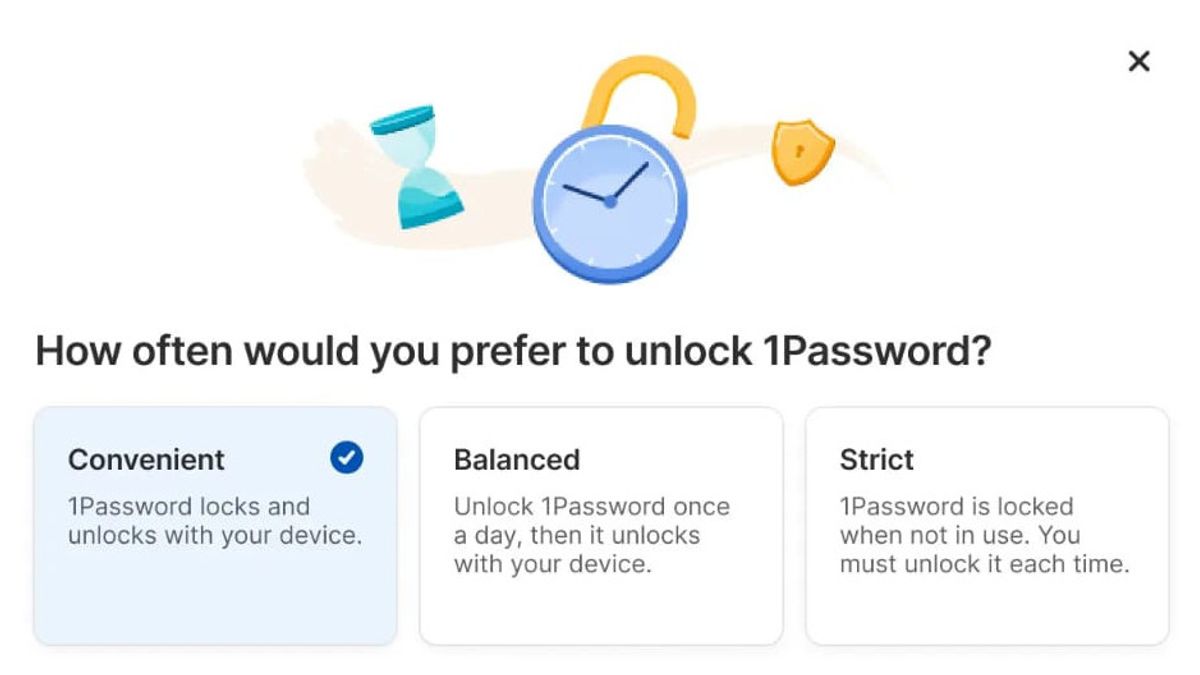
This unlock experience update offers three new setting options. Users can choose the security level that suits their needs the most. The three settings include Comfortable, Balanced, and Strict.
Comfortable Settings are used to lock and unlock automatically with the device. Meanwhile, being balanced requires users to unlock 1Password every eight hours.
Meanwhile, the Strict option is designed for users who are always careful. In this setting, 1Password will be locked every time it is not used. Users must manually open it every time they return to using the device.
The English, Chinese, Japanese, Arabic, and French versions are automatically generated by the AI. So there may still be inaccuracies in translating, please always see Indonesian as our main language. (system supported by DigitalSiber.id)
Most Popular Tags
#Prabowo Subianto #donald trump #firearm #8791 #giias 2026Popular


