

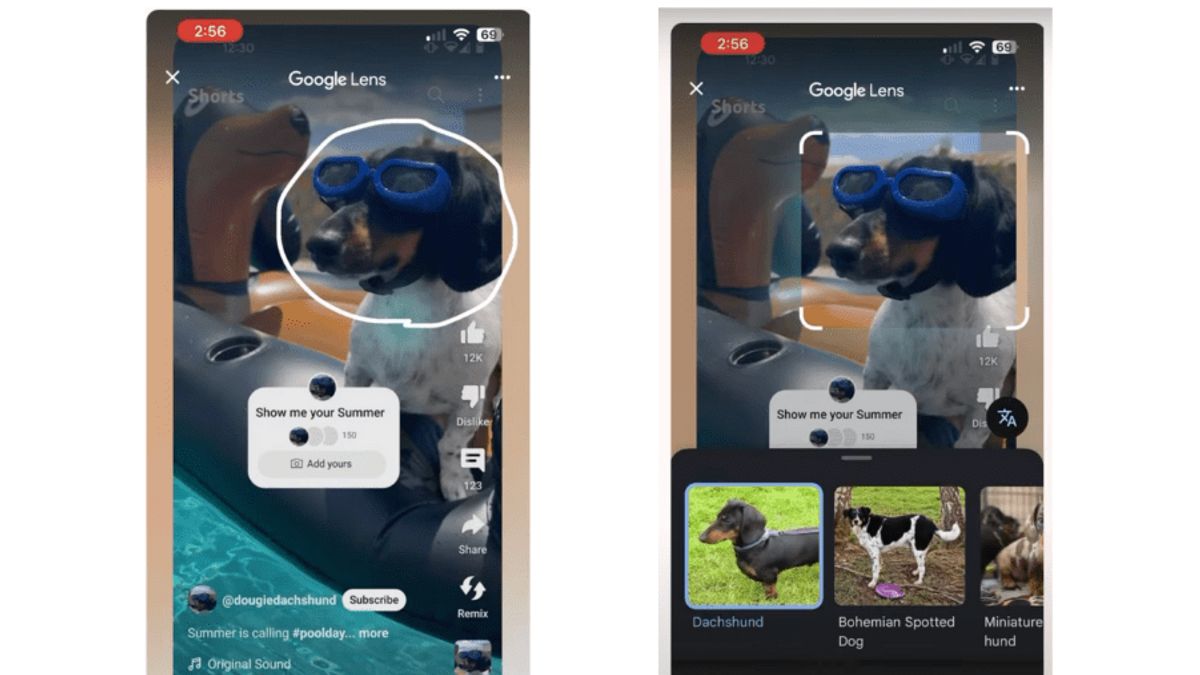


JAKARTA YouTube added a new feature to Shorts, a special platform that displays videos in short format. The video application under Google will take advantage of the Lens feature.
Through the YouTube help page, the video platform says it will launch a beta version that includes Google Lens into Shorts. This feature will be available in the coming weeks.
"You'll be able to use Lens to find what you see while watching Shorts. For example, if you're watching Shorts created at the location you want to visit, you can choose a famous place to identify it," explained YouTube.
YouTube added that users who use the beta version of YouTube will not see ads in the straightening results while trying Lens on Shorts. This feature will also not work on the YouTube Shopping affiliate link or with paid product promotions.
To use Lens on YouTube Shorts, make sure you've used the developer version. After that, go to the YouTube app and tap the Shorts tab to view short videos from various creators.
Find a video showing the object or location you want, then tap the screen until the video is caught. After that, select Lens in the top menu then tap whatever appears in the video. Next, Lens will search for and display the appropriate information.
Search results will be displayed on the Shorts page. Thus, if you have finished looking for the information you want, you can return to watching content as before.
The English, Chinese, Japanese, Arabic, and French versions are automatically generated by the AI. So there may still be inaccuracies in translating, please always see Indonesian as our main language. (system supported by DigitalSiber.id)


