

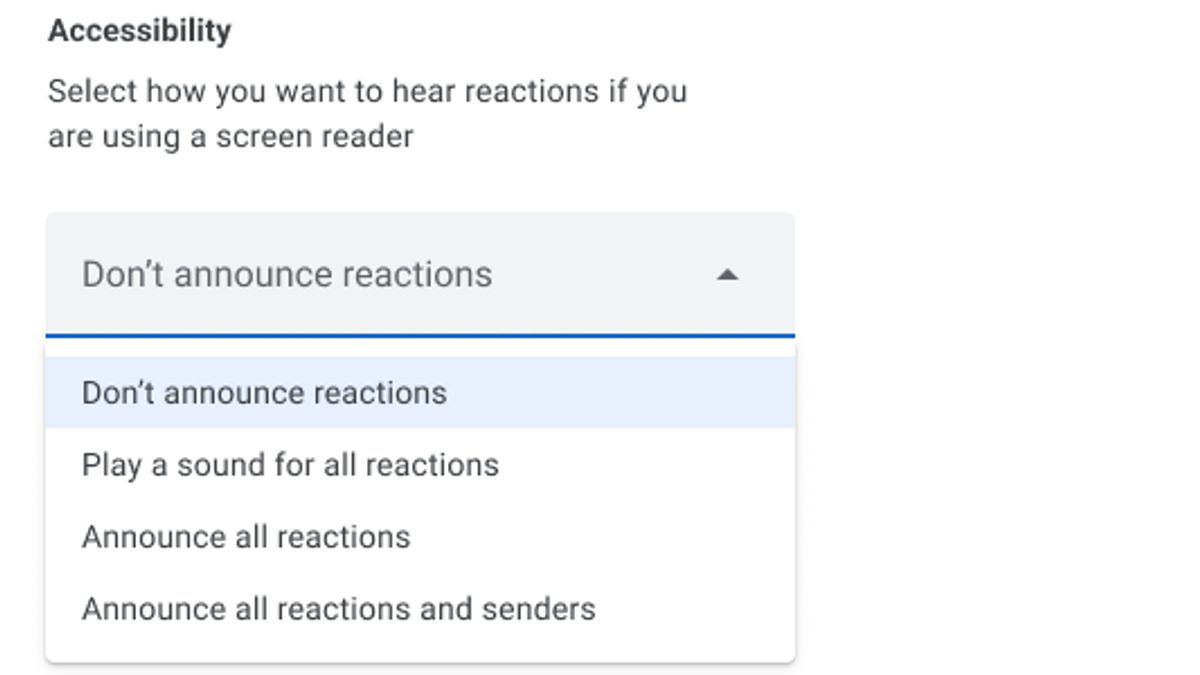


JAKARTA Google Meet recently gained the ability to read reactions during the meeting. This capability was launched for users who experience visual impairments or visual impairments.
During the meeting, reactions can be important notifications. Some virtual meeting participants usually provide emojis when they want to ask questions. All participants on Google Meet can see the sender, except those with visual impairments.
Google presents screen reader support for reactions in meetings. This capability began rolling out on February 3, 2025 with a launch duration of 15 days. It is possible that the visibility of the feature is available more than that time.
"We added several more options for how to react on Google Meet through screen readers," Google said via the Workspace update page. "We hope this new setting helps you configure the experience as you need it."
SEE ALSO:
-
 | TEKNOLOGI
Terungkap! Dampak Hantaman Meteoroid di Mars Ternyata Lebih Dalam dari yang Diperkirakan
05 Februari 2025, 09:35 -
 | TEKNOLOGI
Apple Luncurkan Aplikasi Invites, Layanan Undangan Terbaru dari iCloud+
05 Februari 2025, 13:04 -
 | TEKNOLOGI
Penertiban Nomor, Komdigi Bakal Keluarkan Kebijakan eSIM dalam Dua Minggu ke Depan
04 Februari 2025, 18:35 -
 | TEKNOLOGI
Discord Luncurkan Patch Keamanan Terbaru, Kinerja Aplikasi Android Kini Meningkat
05 Februari 2025, 08:35
Now, there are four screen reader modes that users can choose from. They can only want to know what emoji is sent or includes the sender's name. Here are some reactions readings available in the settings.
To access and set this feature, users can press Shift+R keyboard shortcuts or open Accessibility through Settings. This screen reader option is available to Workspace subscribers as well as personal Google account users.
The English, Chinese, Japanese, Arabic, and French versions are automatically generated by the AI. So there may still be inaccuracies in translating, please always see Indonesian as our main language. (system supported by DigitalSiber.id)


