
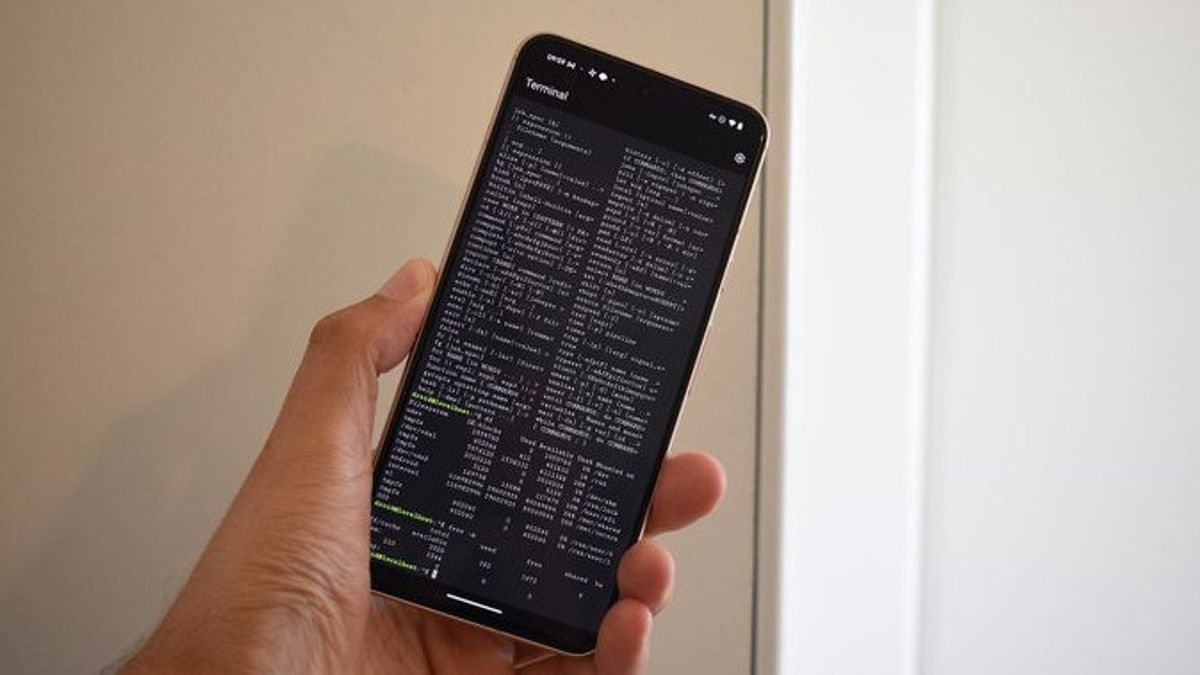


JAKARTA Google has introduced a new Linux Terminal application in the second quarter of Android 15 release. Unlike other terminal emulators, this app connects to Debian instances in isolated virtual machines (VMs) from the main Android system.
However, there is a file access limit, as this VM can only access files shared by Android. Here's how to access files from Android devices into the Linux Terminal:
Transfer files to the "Downloads" folder on Android devices.
Open the Linux Terminal on Pixel devices running the latest Android 15 or Android 16 beta.
Use Linux command to access files in the following folders:
CopyEdit
CopyEdit
cd/mnt/sharedwas
Here to see the file list.
cat namefile.txt to read the contents of the file.
Files added, edited, or deleted in the folder "Downloads" will be immediately updated both on Android and on Linux VM.
Only the "Downloads" folder can be accessed from the Linux Terminal.
Files from other libraries such as Documents or Images are inaccessible.
Although the app has a access to all files' license, this access is designally limited by Google.
SEE ALSO:
-
 | TEKNOLOGI
Kaspersky Bagikan Tips Cara Menjaga Aset Kripto yang Aman dari Pencurian
23 Maret 2025, 16:10


The latest version on Android 16 beta already has a tab interface for multitasking.
Google is developing graphics application support, allowing users to run the Linux desktop application on Android.
While Google doesn't plan to make Terminal a substitute for full desktop mode, users can still install the desktop environment for a more complete experience.
While still limited in file access, new Linux Terminals on Android open up wider opportunities for users who want to access Linux systems on their devices. If Google expands access to other libraries, this could be a more flexible productivity solution for Android and Linux users.
The English, Chinese, Japanese, Arabic, and French versions are automatically generated by the AI. So there may still be inaccuracies in translating, please always see Indonesian as our main language. (system supported by DigitalSiber.id)
Most Popular Tags
#Prabowo Subianto #donald trump #firearm #8791 #giias 2026Popular


