

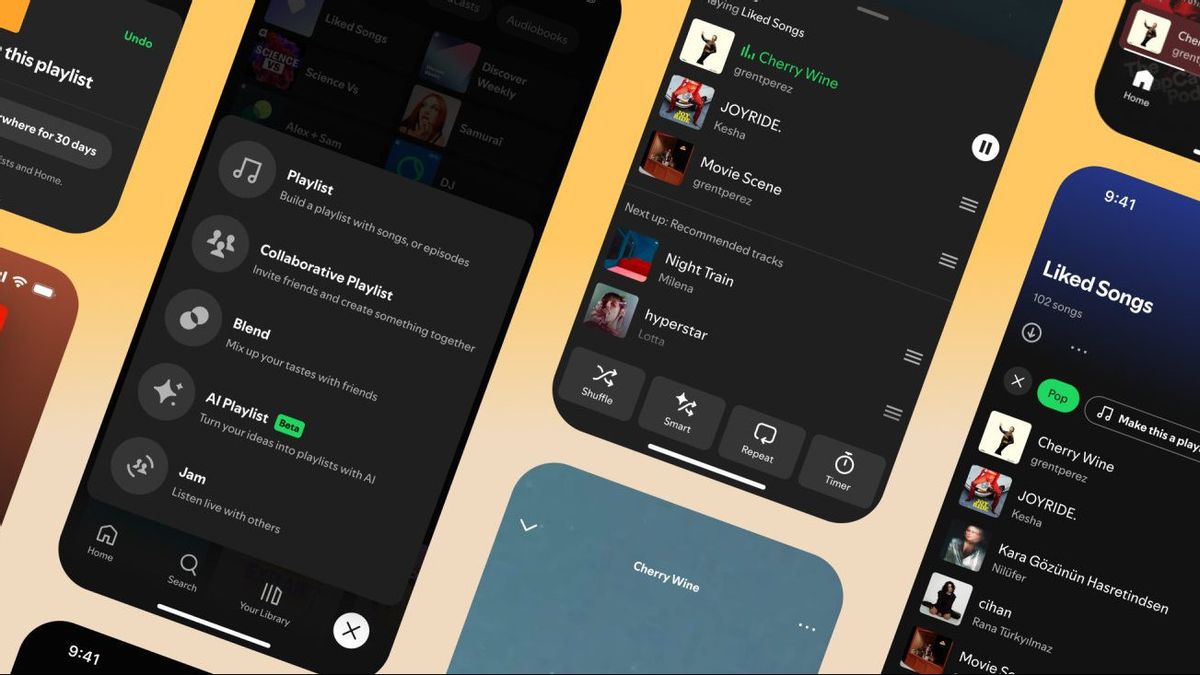


JAKARTA Spotify changed the queue interface, a feature that displays a list of song queues, for Premium users. The design is now easier to use because it includes some important controls.
Queue is located at the bottom of the now playing view, precisely in the third row. If taped, the user will see three buttons at the bottom, namely shuffle, repeat, and Sleep Timer. Users can disable and activate all three buttons easily.
The shuffle is used to randomly play songs in queues, while the Repeat is used to play the same songs over and over again. Meanwhile, a Sleep Timer provides a time option to determine when Spotify will shut down.
When the song that users play ends, the queue will display all the songs Spotify recommends. They can determine which songs remain in the queue and which songs to remove from the queue list.
Spotify has also changed the function of the Hide button. This feature will be visible in the playlist when the user taps the three-dot button on the song. If hidden, the song will disappear from the playlist and will not be played again by Spotify.
SEE ALSO:
-
 | TEKNOLOGI
Google Hadirkan Aplikasi Gemini untuk iPad, Bisa Diunduh di App Store
08 Mei 2025, 08:35



However, a number of users often realize that this feature doesn't work optimally. If they hide the song on their cellphone, this song may just play on their tablet. Therefore, Spotify changed the work system of its features.
"The updated Top Hide is now more intuitive, and when you tap it, the song will be hidden from the playlist on all devices, so we're not going to play it again on the playlist," Spotify explained.
All these changes have been rolled out across devices, both Android and iOS. If you haven't seen these changes, you can visit the Spotify page on the Google Play Store or App Store to update the app.
The English, Chinese, Japanese, Arabic, and French versions are automatically generated by the AI. So there may still be inaccuracies in translating, please always see Indonesian as our main language. (system supported by DigitalSiber.id)
Most Popular Tags
#Prabowo Subianto #donald trump #Febrie Adriansyah #8791 #giias 2026Popular


