
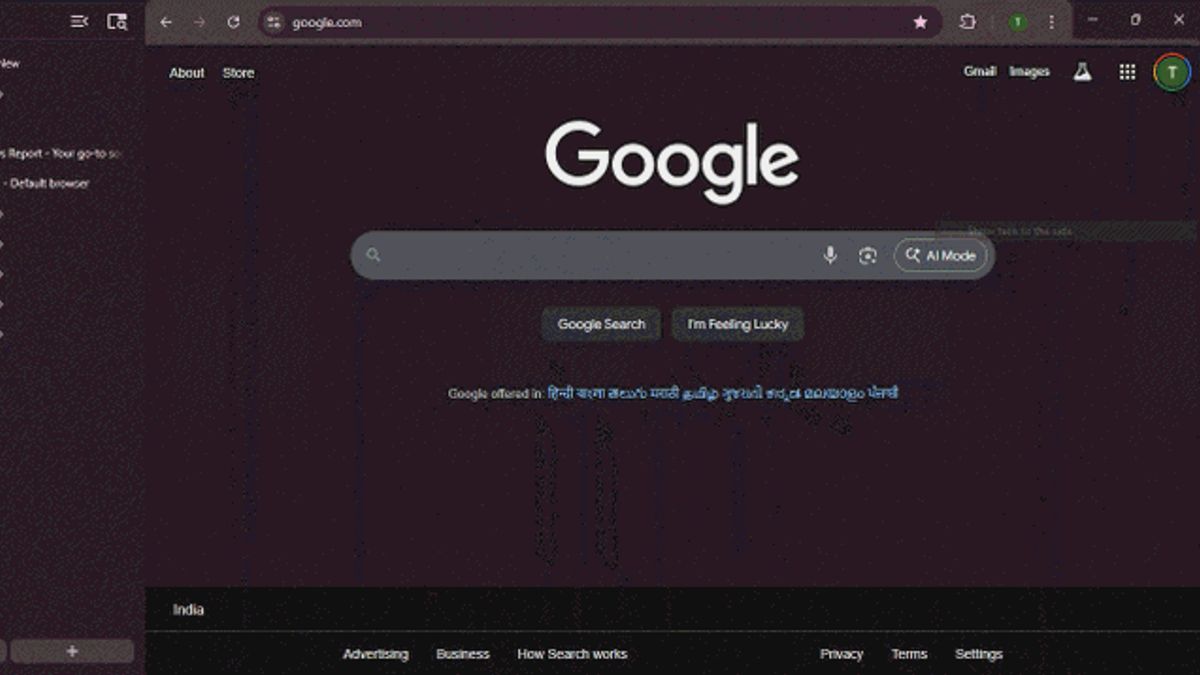


JAKARTA - Google has finally started presenting the vertical tabs feature in Chrome, a display that accumulates tabs on the sidebar on the left. This feature has long been awaited by users, especially since many competing browsers such as Vivaldi, Edge, Firefox, and Brave have already offered a vertical tab display that is considered more efficient.
For now, the new vertical tabs feature is available on Canary version Chrome for desktop. This option will appear when the user right-clicks on the vertical tab bar.
According to a Windows Report report, Chrome Canary users can now try the vertical tab display. The method is quite easy: right-click on the horizontal tab bar at the top, then select the Show tabs to the side' option. Once activated, all tabs will be vertically compiled on the left side of the browser window.
SEE ALSO:
-
 | TEKNOLOGI
Hingga Akhir 2025, Kripto Global Diprediksi dalam Fase Konsolidasi
22 November 2025, 15:50 -
 | TEKNOLOGI
miHoYo Umumkan Varsapura, Gim Dunia Terbuka Baru yang Penuh Rahasia
21 November 2025, 20:05



At the top of the pause, users can find the Tab Search feature as well as buttons to shrink or expand the tab bar. Meanwhile, Tab Groups and the plus button (+) to open the new tab are placed at the bottom. Interestingly, all of these buttons are functioning properly even though the feature is still in the early stages of development.
For users who do not fit this new look, Chrome also provides the option to return to the old layout. Just right-click in the sidebar area and select Show tabs at the top.
Even though it can be tried, this feature is not really mature. Vertical Tabs is still exclusive on the Canary channel and is not as smooth as the implementation in other browsers. This means that the public still has to wait some time before this feature is available in the stable version of Chrome.
The existence of a vertical tab provides an advantage in saving space at the top of the browser and facilitating navigation between tabs, especially when opening multiple pages at once. With this new step, Google has finally begun to catch up in terms of user design and experience in Chrome.
The English, Chinese, Japanese, Arabic, and French versions are automatically generated by the AI. So there may still be inaccuracies in translating, please always see Indonesian as our main language. (system supported by DigitalSiber.id)
Most Popular Tags
#Prabowo Subianto #donald trump #Febrie Adriansyah #8791 #giias 2026Popular


