

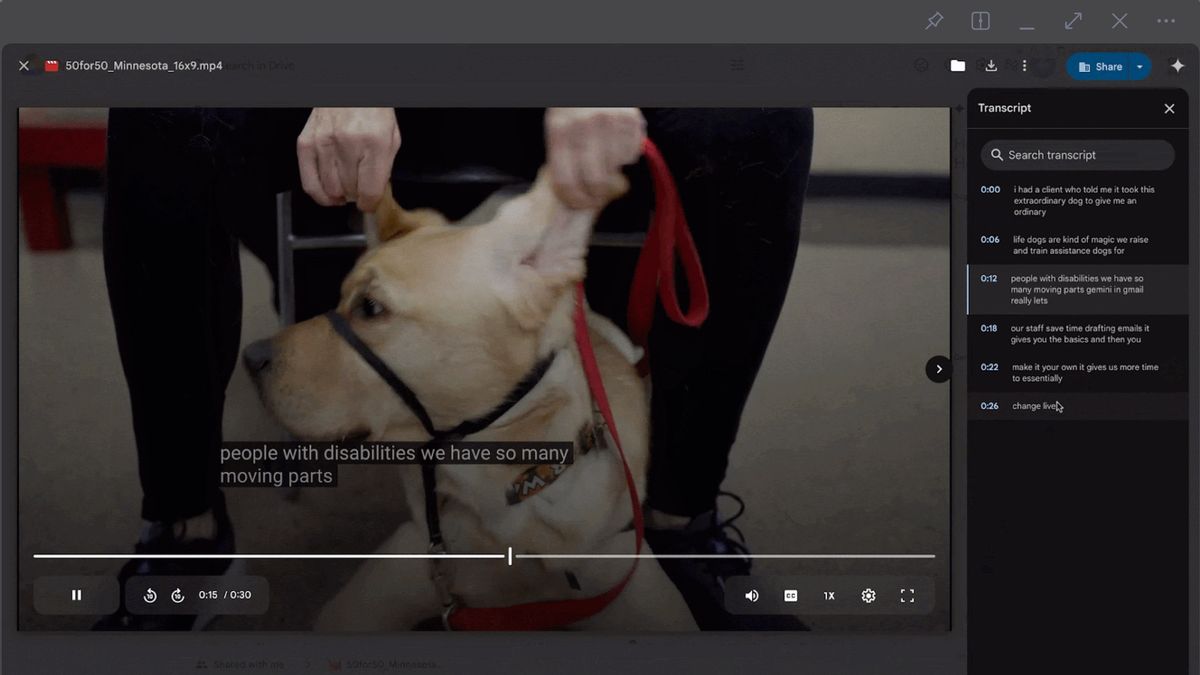


JAKARTA Google Drive introduced a video transcript feature, a new tool to view content efficiently. This feature is being launched in stages since Monday, February 24 to all Drivers.
Last year, Google improved video accessibility on the Drive platform by rolling out text maker features automatically. This feature can save users who often make text manually.
However, for users who need information in certain parts, they will still have difficulty finding the video section. Therefore, Google added the ability to transcript video and the ability to search for transcripts.
The transcript feature can be a substitute for subtitles in the same language so that it helps users who have hearing loss or are in noisy environments. To activate the feature, users only need to click the gear icon at the bottom left.
SEE ALSO:
-
 | TEKNOLOGI
Bermitra dengan Google, Chipset Qualcomm Akan Dukung Pembaruan Android Hingga 8 Tahun
25 Februari 2025, 11:35 -
 | TEKNOLOGI
Anthropic Luncurkan Claude 3.7 Sonnet, Bisa Kasih Jawaban Cepat dan Lambat
25 Februari 2025, 12:05 -
 | TEKNOLOGI
Perbedaan Bioteknologi Konvensional dan Modern dalam Kehidupan Manusia
25 Februari 2025, 14:10
After that, select the Transcript option at the bottom and the transcript list will appear in the left sidebar. Users will see the text display spoken in the video with a time caption. At the top, Drive users will see the Transcript Search bar.
If users remember the dialogue in the video, but forget how much the dialogue was said, they can tap the Transcript Search bar. After that, input the words you're looking for and Google will display the transcript with its time stamp.
This feature will be launched for all users, whether Google Workspace subscribers, Individual Google Workspace subscribers, or even personal Google account users. As usual, the launch of the feature will take place in fifteen days.
The English, Chinese, Japanese, Arabic, and French versions are automatically generated by the AI. So there may still be inaccuracies in translating, please always see Indonesian as our main language. (system supported by DigitalSiber.id)
Most Popular Tags
#Prabowo Subianto #donald trump #firearm #8791 #giias 2026Popular


