


JAKARTA - The Camera App on iOS 26 is experiencing a major update specifically designed for content creators, with a more concise interface while making format and resolution management easier.
The Camera app has always been one of the important features for Apple in selling iPhones to consumers. With a fairly simple interface, this app allows users to quickly take pictures and save them to the Photo app. In addition, this application also offers additional features such as panorama and video recording with the ProRES or LOG format.
On iOS 26, the Camera app gets major updates both in terms of appearance and function, which novice YouTubers will definitely like.
The Camera app is known for its minimal appearance and does not interfere when the user takes a photo. With a new approach called Liquid Glass, this interface becomes simpler. The shutter button is now placed higher and is separated from the bottom of the screen, making it easier to find and use. In addition, zoom buttons are also placed closer to the shutter, making it easier to zoom settings when shooting.
The camera function line is now positioned under the shutter button, so it doesn't get in the eye when shooting. By default, only Photo and Video options are visible, while other options can be accessed by pressing and sliding. Bigger icons in the settings menu in the top corner of the screen also make it easier to use.
One of the weaknesses of the previous version is that some important settings such as formats and resolutions must be accessed through the Settings app, which makes them less practical. On iOS 26, these settings can still be accessed in Settings, but now related icons appear directly in the Camera app when enabled.
Important information such as format, resolution, and frame rate now appear clearly in the upper left corner of the screen. Users can easily switch to the RAW format for photos, select 48MP resolution, or adjust the video to the HDR or LOG ProRES format with a resolution of up to 4K and frame rate between 24 to 60 fps.
This is a huge improvement over iOS 18 which is limited in photo settings and makes video settings feel troublesome because it has to change format by tapping repeatedly.
SEE ALSO:
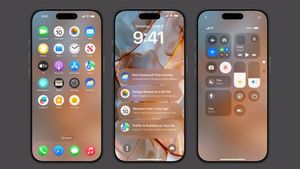



This change demonstrates Apple's commitment to supporting content creators by providing an intuitive, simple Camera app when used, but also offers more free settings for those who want to set technical details.
The new interface reduces disruption when the user is working, without sacrificing important functions. The ease of rapidly changing resolution and frame rate is a huge added value for videographers who want more control.
Previously, some limitations of the Camera app could make creators turn to third-party apps for more complete and convenient settings. With this update, Apple provides a strong reason for creators to keep using the default app.
Although it seems that there is a minimal increase, this change is carried out appropriately and focuses on the needs of users.
The English, Chinese, Japanese, Arabic, and French versions are automatically generated by the AI. So there may still be inaccuracies in translating, please always see Indonesian as our main language. (system supported by DigitalSiber.id)
Most Popular Tags
#Prabowo Subianto #donald trump #Febrie Adriansyah #8791 #giias 2026Popular


